Classroom Accessibility
Classroom Accessibility Standards (CAS): Implementation Guidance
This document serves as a supplemental guideline for the Classroom Accessibility Standards (CAS) and explains the rationale for many of the standards listed. The information presented discusses the importance of each benchmark in the CAS standards.
Per the compliance information in the 2010 ADA Standards, if construction began after March 15, 2012 (i.e., new construction), the 2010 ADA Standards should be followed. Buildings with no renovations after March 15, 2012 can follow either the 1991 standards or the 2010 standards, both of which make similar provisions.
For additional information, please review the following references:
- 2010 ADA Standards for Accessible Design (opens in a new tab)
- Comparison of the 2010 and 1991 ADA Standards for Accessible Design (PDF) (opens in a new tab)
What are the main features of an accessible computer lab?
Designing a lab that is universally accessible begins with the physical environment of the facility. Considerations for making a computer lab facility more accessible include the following:
- Make sure doorway openings are at least 32 inches wide and doorway thresholds are no higher than 1/2 inch.
- Keep aisles wide and clear for wheelchair users. Have protruding objects removed or minimized for the safety of users who are visually impaired.
- Make sure all levels of the lab are connected by a wheelchair-accessible route of travel.
- For students with mobility impairments, make sure there are procedures in place for retrieving materials that may be inaccessible.
- Make sure ramps and/or elevators are provided as an alternative to stairs. Elevators should have both auditory and visual signals for floors. Elevator buttons should be marked in large print and Braille or raised notation and be easily reachable for wheelchair users.
- Locate the lab near wheelchair-accessible restrooms with well-marked signs.
- Service desks need to be wheelchair-accessible.
- Provide ample, high-contrast, large-print directional signs throughout the lab. Mark equipment in the same fashion.
- Provide study carrels, hearing protectors, or private study rooms for users who are easily distracted by noise and movement around them.
- Provide at least one adjustable-height table with easily reachable controls for each type of computer.
- Have wrist rests available to those who require extra wrist support while typing.
- Keep document holders available to help users position documents for easy reading.
First Steps
To begin the process of making your computer lab accessible to everyone, take the following steps.
- Include students with disabilities in planning and evaluating lab products and services.
- Develop policies and procedures that ensure access to lab facilities, computers, and electronic resources for people with disabilities. Require that accessibility be considered in the procurement process.
- Ensure that the facility and services are wheelchair-accessible and publications can be reached from a seated position.
- In key lab documents, include a statement about your commitment to universal access and procedures for requesting disability-related accommodations.
- Make signs with high contrast and large print.
- Make key documents available in formats accessible to those who have low vision and those who are blind (e.g., large print, Braille, electronic).
- Although a lab cannot be expected to have specialized equipment for every type of
disability on hand, staff should make equipment available that they anticipate will
be most often used or that is available at relatively low cost. This might include:
- an adjustable table for each type of workstation in your lab;
- a wrist rest and forearm rest;
- a trackball;
- software to modify keyboard response such as sticky keys, repeat rate, and keystroke delay (that may be available in the operating system);
- software to enlarge screen images (that may be available in the operating system), along with a large monitor;
- large-print keytop labels; and
- web resources that adhere to accessibility standards or guidelines adopted by the lab.
- Once a lab is established and serves a large number of users, consider adding:
- text-to-speech software;
- scanner and optical character recognition (OCR) software;
- CCTV to enlarge printed documentation;
- Braille translation software and printer;
- word prediction software;
- hearing protectors;
- keyboard guards to assist those who have limited fine motor skills;
- alternative keyboards, mini-keyboards, or extended keyboards for users with mobility impairments;
- speech input software; and
- one-handed keyboards or “keyboard layout” software.
- Develop a procedure to ensure quick responses to requests for assistive technology that you do not currently have available or for other disability-related accommodations.
- Train staff on available accessible products in the lab, on appropriate communication, and on procedures for addressing requests for accommodations. Include accessibility issues in all training offered in the lab.
- Include people with disabilities when addressing accessibility in periodic lab evaluations.
Computer Lab Accessibility Guidelines
The following are guidelines for equipment, software, signage, and other elements in computer labs on campus. Although these are guidelines, all equipment and other elements in the computer lab must comply with the SUNY Electronic and Information Technology (EIT) Accessibility Policy:
Any information and technology — including, but not limited to, computers and ancillary equipment, instructional materials, software, videos, multimedia, telecommunications, or web-based content or products — developed, procured, maintained, or used in carrying out university activities must be compliant with Sections 504 and 508 of the Rehabilitation Act of 1973, as amended, the Americans with Disabilities Act of 1990, as amended, and other related local, state, and federal laws, as well as other related university policies.
Timeline
It was required that the items needing remediation be corrected before the start of the Fall 2015 semester.
Signs and Documentation
Signs should be printed with the following attributes:
- 18 point sans serif fonts (see the 2010 ADA Standards (opens in a new tab) for specifics regarding fonts and spacing)
- High-contrast colors (i.e., black on white)
- Capital letters
- No italics, oblique angles, scripts, or other decorations
- Braille (either on the same sign or on a different sign)
If accessibility symbols are used, they should be the International Symbol of Accessibility.
Signs with tactile characters (Braille) should be positioned so that the baseline of the lowest character is 48” above the floor and the baseline of the top character is a maximum of 60” from the floor. Visual characters must be at least 40 inches from the floor.
Documentation should be available in both print and Braille, and should be positioned no more than 48” above the floor.
An alternative to putting Braille on signs around the lab is to have an HTML or Word document available in the “Accessibility Tools” folder labeled “policies and guidelines.” Electronic copies of the documentation are an acceptable alternative to Braille documents.
Counters
Counters are service counters, such as where a student would sign equipment in or out, use log books, or swipe to release a Pay to Print job. Surfaces where people perform the majority of their work, such as desks and tables, are considered work surfaces and are discussed in later sections.
Counters should have at least one section at an acceptable height for patrons in wheelchairs or scooters: at most 36” from the floor, and at least 36” wide (30” wide if approached from the front; otherwise it should be adjacent to a walking surface that is at least 30” by 48”). If writing is required (for example, a sign in/out log), the height should be between 28” and 34” from the floor.
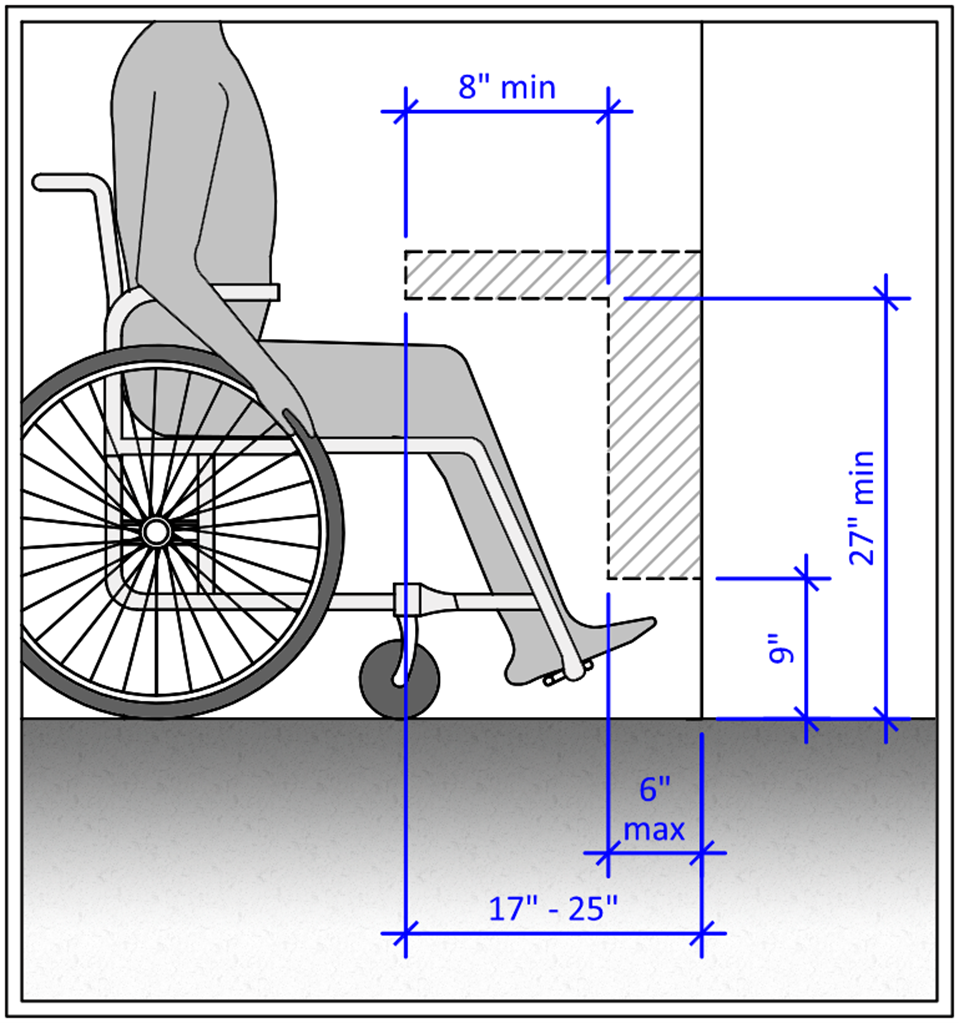
Figure 1 – Toe and knee clearance for front approach counters (view larger Figure 1 (opens in a new tab))
Forward approach counters must have knee and toe space under the counter: at least 30” wide, extending 17” under the counter with a height of 27” above the floor, with a toe clearance of 6” beyond the knee clearance at a height of 9” above the floor.
Pay to Print
At least one Pay to Print (also known as UniPrint) station for each format of printer (i.e., standard desktop printer vs. plotter) should be located so it is wheelchair accessible (see counter requirements).
The Pay to Print station should be a PC-based station that has the NVDA screen reader installed, and it should have the option to adjust the contrast.
Output trays and bins for printers managed by an accessible Pay to Print station should be between 15” and 48” from the floor (between 24” and 40” preferred) and 20” to 25” from the center of where the person’s lap is expected to be.
Workstations and Other Equipment
Minimum Number of Hardware Accessible Workstations
It may not be feasible for a department to deploy accessible hardware on every computer in every lab. However, there are minimum numbers of accessible stations that need to be in each lab.
For each type of computer in the lab (i.e., PC, Mac, CAD station, scanning station, and breakout room), the number of accessible stations of that type should follow this chart:
| Number of stations of each type | Minimum number of accessible workstations |
|---|---|
| 1 to 25 | 1 |
| 26 to 50 | 2 |
| 51 to 150 | 4 |
| 151 to 300 | 5 |
| 301 to 500 | 6 |
| 501 to 5000 | 6, plus 1 for each 150, or fraction thereof, between 501 and 5000 |
Ideally, the accessible stations will be spread throughout the room rather than grouped together, unless the computers of that type are typically grouped together. Workstations with assistive technology should be marked with the International Symbol of Accessibility.
Minimum Standards for Accessible Workstations
There are four elements to consider with the physical dimensions of the work surface:
- Top of the work surface is between 28” and 34” from the floor
- Clearance of at least 27” beneath the top of the work surface to the floor
- The depth underneath the work surface must be between 17” and 25”
- Minimum width of 30” of knee space for seated individuals
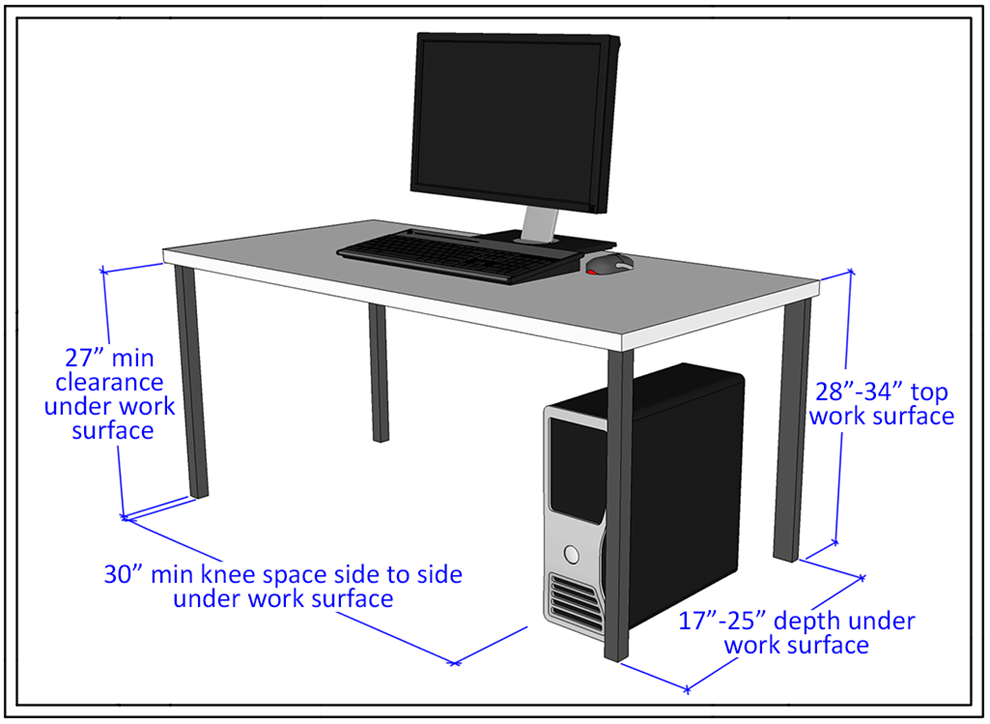
Figure 2 – Work surface requirements (view larger Figure 2 (opens in a new tab))
Clear aisle width between the work surface and a barrier should be at least 48”, with 60” recommended. A minimum of 60” is required for turning. The clear path to the workstation is at least 36” wide (the path can narrow to 32” at a point).
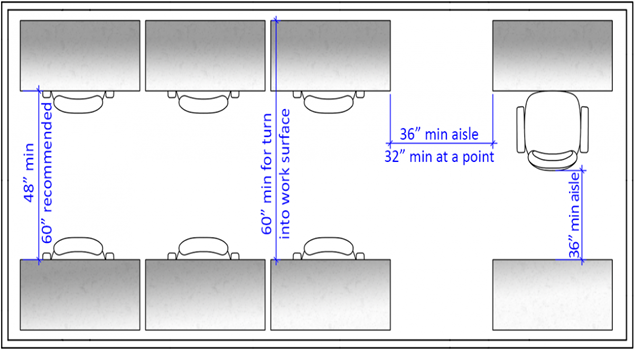
Figure 3 – Aisle space for work surfaces (view larger Figure 3 (opens in a new tab))
Preferred Configuration
A height-adjustable work surface with the following attributes:
- Can be lowered and raised using no more than 5 lbs. of pressure
- Can be adjusted without the need for fine motor control
- Can be raised to standing desk height
- Computer and peripherals are accessible at the lowest and highest settings
Accessible Hardware Configuration
- 21-inch monitor (user is able to adjust resolution)
- Trackball (Kensington 4-Button USB Expert Pro Mouse or equivalent)
- Touchpad (Fellowes Internet Touchpad or equivalent)
- Alternative keyboard: mini keyboard with light touch
- Book edge scanner
- Sound card
- Large-print keyboard via ZoomCaps
- Wrist rests and forearm rests
Software
The following software is required for the accessible workstations:
Accessible PC Workstations
- Scanning/reading program: Kurzweil 1000
- Learning systems tool: Read&Write Gold
- Screen reader: JAWS
- Screen magnification: ZoomText (with speech)
- Voice-to-text: Dragon NaturallySpeaking Professional with MathTalk plugin
- Browser plugin: MathPlayer
Accessible Macintosh Workstations
- Learning systems tool: Read&Write Gold
- Screen reader: VoiceOver
- Voice-to-text: Dragon Dictate for Mac
Accessibility Tools Folder
On every accessible workstation, there must be a readily available folder, or shortcut to the folder, called “Accessibility Tools” with the designated accessibility icon.
Personnel
The new consultant training process should include training on how to use the accessible hardware and software, and on serving customers with disabilities.
Legal & Statutory References
The relevant sections of Section 508 of the Rehabilitation Act of 1973 may include: subpart B 1194.26 for workstations and subpart B 1194.25 for Pay to Print stations. Relevant sections of the 2010 ADA Standards for Accessible Design may include: 304, 305, 306, 308, 309, 703, 802, 902, and 904.